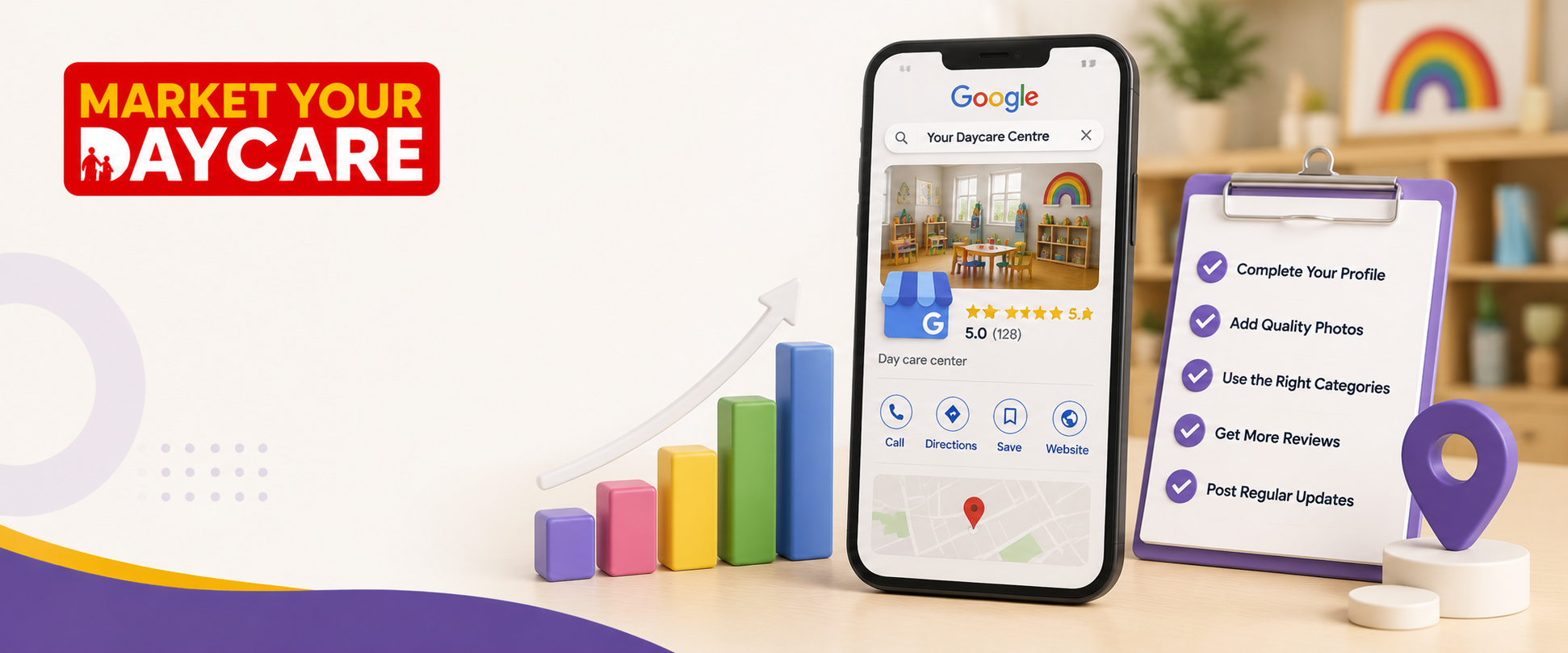
If parents are searching online for a trusted place for their child, your Google Business Profile can become one of your most powerful enrollment tools. For many families, the first impression of a childcare centre happens on Google before they ever visit your website, call your team, or walk through your doors. That is why ranking well on Google Business Profile is such an important part of modern day care marketing.
When your profile appears in local search results, map listings, and “near me” searches, you put your daycare in front of parents at the exact moment they are looking for care. A strong profile can help you attract more calls, more website visits, more direction requests, and more inquiries from families searching for a childcare centre near me.
The good news is that Google Business Profile is not only for large businesses. Even smaller centres can compete locally with the right setup, consistency, and optimization. In this guide, you will learn exactly how to improve your ranking step by step and turn your profile into a steady source of leads.
Table of Contents
-
What Even Is a Google Business Profile?
-
Why It Matters More Than Your Website Right Now
-
Step 1 — Claim and Verify Your Profile
-
Step 2 — Fill Out Every Single Field
-
Step 3 — Pick the Right Categories
-
Step 4 — Get Your Reviews Up (This Is the Big One)
-
Step 5 — Post Every Week Without Fail
-
Step 6 — Upload Real Photos Monthly
-
Step 7 — Answer Questions and Respond to Every Review
-
Step 8 — Keep Your Info Accurate
-
How Long Before You See Results?
-
Conclusion
-
FAQs
What Even Is a Google Business Profile?
You know when you search for something like "Italian restaurant near me" and a map pops up with three options before you even see any websites? That map section is called the Local Pack. The listings inside it are powered by something called Google Business Profile a free tool that lets you tell Google exactly who you are, where you are, and what you offer.
For childcare centres, this is huge.
Parents searching for care don't usually scroll down to page two of Google results. They look at the map, they check which centres have good reviews, and they pick from the top few. If your centre isn't showing up there, it doesn't matter how great your rooms are or how qualified your educators are. Those families don't know you exist yet.
The good news: you can change that. And it doesn't require any ad spend.
Why It Matters More Than Your Website Right Now
Here's something a lot of centre directors don't realise. Your Google Business Profile ranking and your website ranking are two completely separate things. You can sit on page three of regular Google search results and still appear in the Local Pack map if your profile is set up properly.
That map is often the first thing parents see when they search. It takes up most of the screen on a phone. It shows your star rating, your location, your phone number, and your opening hours all before anyone clicks anything at all.
One centre we've worked with went from 12 Google reviews to 67 in 8 weeks, just by texting current families a review request. Their visibility in the map results tripled. Zero dollars in ad spend.
That's the kind of thing that actually moves occupancy numbers.
Step 1 — Claim and Verify Your Profile
Before anything else, you need to own your listing.
Search for your centre name on Google. If a profile comes up with "Own this business?" in the corner, that means it exists, but nobody's claimed it yet. Google sometimes creates basic listings automatically from publicly available data. Click that link and go through the verification process.
If nothing comes up at all, go to business.google.com and create a new profile from scratch.
Google will ask you to verify that you actually run the business. Usually they mail a postcard to your address with a code. They'll also sometimes verify by phone or video call. The postcard can take a couple of weeks to arrive, so don't put this off.
Once you're verified, you're in. Everything else builds from here.
Step 2 — Fill Out Every Single Field
This one sounds obvious, but you'd be surprised how many profiles are half-empty.
Google's algorithm rewards completeness. A profile that's fully filled out tends to rank above one that's 60% done, even if the incomplete centre is physically closer to the person searching.
So go through every section:
Business name — Use your actual trading name. Don't stuff in keywords like "Best Childcare Sydney Pendle Hill." Google penalises that, and it looks odd to parents too.
Address — Your physical address, exactly as it appears on official documents.
Phone number — The number you actually answer. If parents can't reach you, Google notices (through click data) and it affects your ranking over time.
Website — Link to your main site, or better yet, a specific page built for local parents rather than a generic homepage.
Hours — Your actual opening and closing times. Update them for public holidays. A parent who drives past at 7:30am because your profile said you opened at 7 — that parent isn't coming back.
Services — List what you actually offer. Long day care, occasional care, kindergarten programs, CCS subsidised care, OOSH if you run it. The more specific, the better.
Age groups — Make this explicit. "We take children from 6 weeks to 5 years" is something parents search for directly.
Description — Write this yourself. 750 characters. Tell parents what makes your centre different, mention your suburb, keep it conversational. Don't copy-paste from your brochure.
Step 3 — Pick the Right Categories
Your primary category is what Google uses to decide which searches your profile should appear for. Get this wrong and you'll miss whole segments of your audience.
For most long day care centres, your primary category should be "Child Care Agency" or "Day Care Centre." Both work. Pick whichever feels most accurate.
Then add secondary categories for other things you offer: "Kindergarten," "Early Education Centre," "After-School Program" if you run OOSH. Secondary categories let you show up in a wider range of searches without confusing what you mainly do.
Don't over-add categories. Eight categories that don't really apply to your centre hurts more than it helps. Google can tell when a profile is trying to game it.
Step 4 — Get Your Reviews Up (This Is the Big One)
If there's one thing to take from this entire guide, it's this: reviews are probably the single biggest factor in your Local Pack ranking.
Google looks at how many reviews you have, how recent they are, and your overall star rating. A centre with 60 reviews at 4.7 stars will almost always outrank a centre with 9 reviews at 5.0 stars. Volume and recency matter more than perfection.
The target to aim for is 50 or more reviews with a 4.5-star average or higher. That's the level where Google starts consistently showing you in the top three.
Here's what actually works:
Send a text message. Not an email. Not a note in the newsletter. A direct SMS to every current family. Something like: "Hi [name], we'd love it if you could leave us a quick Google review it really helps other families find us. Here's the link: [direct review link]."
The direct link matters. You want to remove as much friction as possible. To find your direct review link, search for your centre on Google, click on your profile, look for the "Ask for reviews" option, and copy that URL.
Send this message on a Tuesday or Wednesday morning. Those days consistently get better response rates than Mondays or Fridays.
Make it a system, not a one-off event. Every time a family has a genuinely positive interaction — a first settling-in session goes well, a staff member handles a tricky situation with grace, a parent sends you a nice email — that's your moment. Don't wait weeks. Send the review request within 48 hours while the feeling's still there.
Don't ask in bulk all at once, especially if you've had a long gap. Google's algorithm can flag sudden spikes. Spread requests out over a few weeks.
Step 5 — Post Every Week Without Fail
Google Business Profile has a Posts feature that most centres completely ignore. It's basically a mini feed attached directly to your listing. Google uses posting activity as a signal that your business is current and relevant.
At a minimum, post once a week.
What to post? It doesn't have to be polished content:
-
Enrolment spots available in a specific room
-
A quick team spotlight on one of your educators
-
What the children have been exploring this week
-
A reminder about CCS subsidies and how they work
-
A seasonal event or incursion you're running
-
A note inviting parents to book a tour
Keep posts short. One or two sentences, add a real photo when you can. The goal isn't to go viral. It's to show Google that someone's actively paying attention to this listing.
Set a recurring reminder in your calendar for the same day every week. Monday morning is a good habit. Just make it automatic.
Step 6 — Upload Real Photos Monthly
Google prioritises profiles with recent, high-quality photos over those that haven't been updated in years.
"Recent" means within the last 30 to 60 days. A listing with a photo uploaded last week signals to Google that this is an active business right now. A listing where the newest photo is from March 2022 says something different.
"High-quality" doesn't mean you need a professional photographer on staff. It means real, well-lit, in-focus photos of what's actually happening at your centre:
-
Outdoor play areas
-
Classroom setups
-
Meals and kitchen spaces
-
Staff working with children (with proper photo consent in place)
-
The front entrance
-
Any recently updated or renovated spaces
Don't use stock images. Parents can spot them immediately, and Google can too. Real photos of your actual space build trust in a way stock photos never will.
One team member can own this task. Ten minutes once a month, a few photos on their phone, and upload them. That's the whole job.
Step 7 — Answer Questions and Respond to Every Review
Two things in your Google Business Profile that don't get enough attention: the Q&A section and the review replies.
The Q&A section lets anyone, and I mean anyone, ask a question about your centre directly on your listing. The problem is, if you don't answer, someone else might. And their answer might be wrong. Check this section weekly. If the same questions keep coming up, write the answer yourself so it's permanently there. Common ones to pre-answer: parking, age groups you take, whether you accept CCS, how your waitlist works.
Review responses matter for every review, not just the bad ones. For positive reviews, a short genuine reply goes a long way. Don't copy-paste the same sentence for every single one — parents can see all your responses on your profile. Vary it. Acknowledge what they specifically mentioned.
For negative reviews: stay calm, stay professional, take it offline fast. Something like: "Thank you for sharing this. We'd genuinely like to talk through your experience — please call us at [number] so we can address this properly." Never argue in the thread. Never over-explain. Just show you heard them and you're willing to sort it out.
How you handle a negative review often tells prospective parents more about your centre than the review itself does.
Step 8 — Keep Your Info Accurate
This seems too simple even to mention. It isn't.
Wrong hours. Changed phone numbers that are still showing the old one. An outdated address. A website URL that now redirects to somewhere broken. These things quietly hurt your ranking because Google tracks what it calls "user satisfaction signals" — basically, do people who interact with your listing have a good experience?
If someone calls the number on your listing and it's disconnected, that's a bad signal. If someone clicks through to your website and it takes eight seconds to load on a phone, that's another one. Google puts these together over time.
Every quarter, spend fifteen minutes going through your profile. Name, address, phone, website, hours, services. Treat it like a small recurring admin task.
If you change your phone number or move premises, update your Google Business Profile the same day you make the change. Not next week.
How Long Before You See Results?
It depends on where you're starting from and how competitive your suburb is.
Starting with a half-empty profile, under 20 reviews, and no recent posts — getting into the top three consistently will probably take two to three months of solid work. Maybe four months if you're in a suburb with several well-established centres already.
Starting from a reasonably complete profile with 30-plus reviews and just needing to be more consistent, you might see meaningful movement in four to six weeks.
The review volume is usually the bottleneck. Everything else on this list you can fix in a day. Building genuine reviews from real families just takes time, so start that piece first.
And don't check your ranking every day. Google's Local Pack results shift based on who's searching and where they're physically located when they search. Check once a month, look at the trend, and keep doing the work.
Conclusion
Getting your daycare to rank in the Local Pack isn't some complicated technical thing. It's just a set of tasks that most centres haven't done yet or started and didn't keep up with.
Claim and verify your profile. Fill out every field. Get your review count above 50. Post weekly. Upload real photos every month. Respond to reviews. Keep your information accurate.
None of this is hard. The centres consistently showing up in the top three aren't doing anything magical, they're just doing the basics, repeatedly, over time.
Pick one thing from this guide and do it today. If your review count is under 30, that's where to start. Send that text message this afternoon.
If you want to see how your centre's visibility compares to competitors right now in your specific suburb, the free Childcare Occupancy Scorecard covers this as one of its six diagnostic stages. It takes about three minutes and shows you exactly where the gaps are.
FAQs
Q: Is Google Business Profile free to use?
A: Yes, completely free. Setting it up costs nothing. Managing it costs nothing. There's no paid tier that gives you better ranking — it's the same tool for every business, and the centres at the top earned their spot through consistency, not spending.
Q: How many reviews do I need to get into the top three results?
A: There's no exact number, and it varies by suburb. In quieter areas, 20 to 30 solid reviews might do it. In competitive metro areas, you might need 60 or more. The easiest way to figure out your target: search your suburb's main childcare term right now, look at the top three results, count their reviews. That's what you're aiming to match or beat.
Q: Can I ask current families to leave reviews?
A:Yes, absolutely. It's completely fine and normal to ask. What you can't do is pay for reviews, offer fee discounts in exchange for them, or post fake ones. Asking a family who had a great experience to share that on Google is not just allowed — it's encouraged by Google's own guidelines. A direct SMS with the review link is by far the most effective method.
Q: Does my NQF rating show up on Google and affect my ranking?
A: Google doesn't pull data from ACECQA directly, so your NQF rating doesn't appear on your profile automatically. But your rating affects parent perception, which affects your reviews, which very much affects your ranking. Centres going through NQF reassessment also have a natural opportunity to create weekly posts about their quality improvement work — and that posting activity is a direct ranking signal.
Q: What if someone leaves a fake or clearly unfair negative review?
A:You can flag it to Google for removal if it violates their review policies — spam, fake account, has nothing to do with your business, contains personal information. Log into your Business Profile, find the review, and report it. The process can be slow and Google doesn't always remove things you'd expect them to. While you're waiting, respond publicly and professionally. A calm, measured response to an unfair review consistently does more for your reputation with prospective parents than the absence of the review would.